Hi Pythonistas!
Last post you added more servers.
Server1
Server2
Server3
Now you have a new problem.
A request comes in.
Which server handles it?
How does the request even know Server2 exists?
Left to themselves
all traffic goes to Server1.
Server2 and Server3 sit idle.
You need something in the middle.
That something is a Load Balancer.
What Is a Load Balancer?
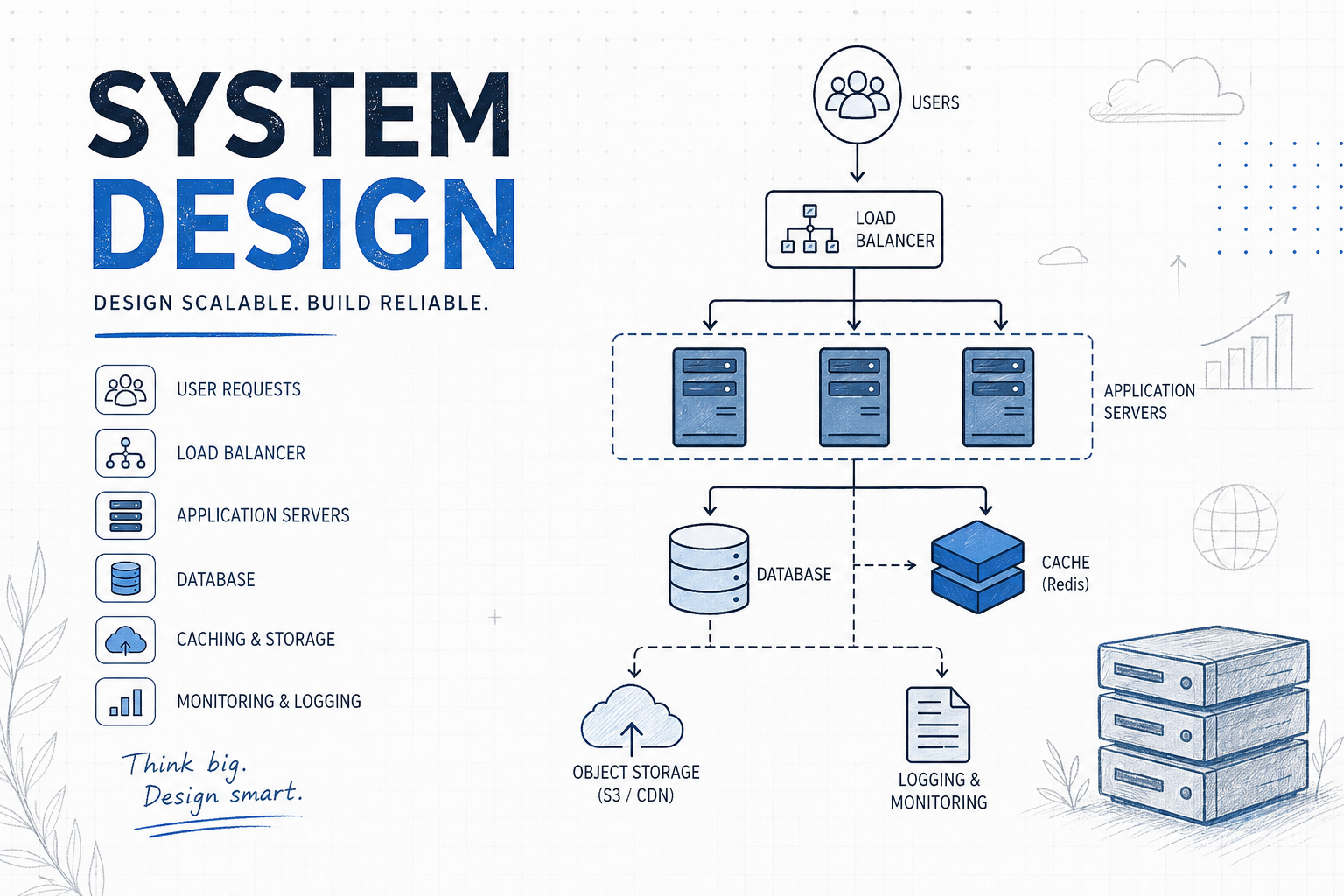
A load balancer sits between the client and your servers.
Client
↓
Load Balancer
↓ ↓ ↓
Server1 Server2 Server3
Client never talks to your servers directly.
Client always talks to the load balancer.
Load balancer decides who handles each request.
From the client's perspective:
there is only one server.
The load balancer's IP.
What happens behind it invisible.
Does It Affect Your Application Code?
No.
Your application doesn't know a load balancer exists.
It just receives HTTP requests.
POST /users
Authorization: Bearer xyz
Content-Type: application/json
Doesn't matter if that request came through:
Nginx (software LB).
F5 BIG-IP (hardware LB).
AWS ALB (cloud LB).
No load balancer at all.
Same request. Same code handles it.
Think of it like a postal sorting office.
Letters arrive.
Sorted. Distributed to postmen.
Each postman delivers to houses.
The house (your app) just receives a letter.
Doesn't know or care about the sorting office.
One Thing That Can Affect Your Code
There is one indirect impact.
The X-Forwarded-For header.
When load balancer forwards a request:
it appears to come from the load balancer's IP.
Not the real client IP.
Without LB:
request.remote_addr = 192.168.1.5 ← real client IP
With LB:
request.remote_addr = 10.0.0.1 ← load balancer IP
If your app needs the real client IP:
client_ip = request.remote_addr

# correct  - gives real client IP

client_ip = request.headers.get('X-Forwarded-For')
Load balancer adds this header automatically:
X-Forwarded-For: 192.168.1.5
Your code reads it from headers instead.
One line change.
That's it.
Load Balancer Algorithms
How does the load balancer decide which server gets the request?
Several algorithms. Each with different tradeoffs.
Round Robin
Rotate through servers in order.
Request 1 → Server1
Request 2 → Server2
Request 3 → Server3
Request 4 → Server1
Like dealing cards around a table.
Simple. Equal distribution.
But:
doesn't consider server load.
Server1 might be handling a heavy request.
Server2 might be idle.
Round robin sends next request to Server2 regardless.
Weighted Round Robin:
Some servers are more powerful.
Give them more requests.
Server1 (8 CPU) → weight 4 → 4 out of every 6 requests
Server2 (2 CPU) → weight 1 → 1 out of every 6 requests
Server3 (2 CPU) → weight 1 → 1 out of every 6 requests
Least Connections
Send request to the server with fewest active connections.
Server1: 100 active connections
Server2: 45 active connections ← next request goes here
Server3: 67 active connections
More intelligent than round robin.
Considers actual server load.
But:
doesn't consider how heavy each connection is.
100 light connections might be easier than 10 heavy ones.
IP Hash
Hash the client's IP address.
Result determines which server they go to.
Hash(192.168.1.5) % 3 = 1
→ always goes to Server2
Same client always hits same server.
This is called sticky sessions.
Useful if server stores session data locally.
But:
uneven distribution if some IPs generate more traffic.
One server can get overloaded.
Least Response Time
Send to the server with:
fewest active connections AND lowest average response time.
Server1: 50 connections, 200ms avg
Server2: 60 connections, 50ms avg ← next request here
Server3: 40 connections, 300ms avg
Most intelligent basic algorithm.
Considers both load AND speed.
Consistent Hashing
More advanced.
Used heavily in distributed systems.
Hash the request (by URL, user ID, etc.)
Map result to a server on a virtual ring.
Ring:
0 ── Server1 ── Server2 ── Server3 ── 360°
Request hash = 145° → Server2
Request hash = 280° → Server3
Request hash = 40° → Server1
Why it's special:
Add a new server?
Only a fraction of requests rerouted.
With round robin
add/remove a server → everything reshuffles.
With consistent hashing
add/remove a server → minimal disruption.
Critical for caching systems.
We'll see it again in upcoming posts.
Layer 4 vs Layer 7
Load balancers operate at different network layers.
Layer 4 - Transport Layer
Works at TCP/UDP level.
Sees:
Source IP
Destination IP
Port
Doesn't read HTTP headers.
Doesn't know what URL is being requested.
Just forwards TCP connections.
Fast. Low overhead. Dumb.
Can't route /api to one server and /static to another.
Layer 7 - Application Layer
Works at HTTP level.
Can read:
URL path
HTTP headers
Cookies
Request body
Can make intelligent decisions:
/api/* → route to API servers
/static/* → route to CDN
/admin/* → route to admin servers
Slower (relatively — still milliseconds).
Smart.
Most modern load balancers are Layer 7.
Health Checks
Load balancer constantly monitors servers.
Every few seconds:
Load Balancer → Server1: "are you alive?"
Server1: "yes, healthy" ✅
Load Balancer → Server2: "are you alive?"
Server2: "yes, healthy" ✅
Load Balancer → Server3: "are you alive?"
No response... ❌
Load Balancer: "Server3 is down. Stop sending traffic."
Active health checks:
Load balancer proactively pings:
GET /health HTTP/1.1
Response:
200 OK
{"status": "healthy"}
No response or error → server marked unhealthy.
Passive health checks:
Load balancer watches real traffic.
Server returns 500 errors → mark unhealthy.
Server too slow → mark unhealthy.
Session Persistence (Sticky Sessions)
Ideally any server handles any request.
But sometimes you need the same user on the same server.
Example:
Shopping cart stored in server's local memory.
User adds item → goes to Server1.
Next request → load balancer sends to Server2.
Server2 has no cart data.
Cart is empty.
User is angry.
Sticky sessions solve this.
Load balancer tracks which server each user is connected to.
Using a cookie:
Cookie: LB_SESSION=server1
Same user → always Server1.
But:
Server1 goes down → session lost.
This is why stateless design is better.
Store session in Redis.
Any server reads it.
No sticky sessions needed.
Software vs Hardware Load Balancers
| Software LB |
Hardware LB |
|
| Cost | Cheap/Free | $10,000-$100,000+ |
| Performance | Good | Extremely fast |
| Management | Your team | Vendor |
| Setup | Minutes | Days/weeks |
| Who uses it | Startups | Banks, telcos |
Hardware LBs are specialized machines.
Built for one job: route packets extremely fast.
Software LB (Nginx): ~100,000 requests/second
Hardware LB (F5): ~1,000,000+ requests/second
Processes packets at hardware level.
Before OS even sees them.
A bank processing millions of transactions per second
cannot afford 1 second of downtime.
Hardware LB worth $100,000 to them.
For a startup Nginx is perfectly fine.
Cloud Load Balancers Best of Both:
Performance → near hardware level
Cost → pay per use ($0.008/hour)
Management → zero, cloud handles it
Scaling → automatic
This is why most modern companies use cloud LBs.
No hardware to buy.
No software to maintain.
Just configure and use.
Nginx as Load Balancer
Most developers encounter Nginx first.
Simple config:
upstream backend {

    server server1.internal:8080;

    server server2.internal:8080;

    server server3.internal:8080;

}


server {

    listen 80;

    location / {

        proxy_pass http://backend;

    }

}
Round robin by default.
Least connections:
upstream backend {

    least_conn;

    server server1.internal:8080;

    server server2.internal:8080;

    server server3.internal:8080;

}
Weighted:
upstream backend {

    server server1.internal:8080 weight=4;

    server server2.internal:8080 weight=1;

    server server3.internal:8080 weight=1;

}
Health check:
upstream backend {

    server server1.internal:8080 max_fails=3 fail_timeout=30s;

    server server2.internal:8080 max_fails=3 fail_timeout=30s;

    server server3.internal:8080 max_fails=3 fail_timeout=30s;

}
3 failures in 30 seconds → server removed temporarily.
The Load Balancer Problem
Wait.
Load balancer is now a single point of failure.
Load Balancer goes down
→ ALL servers unreachable
→ total outage
Didn't we just try to avoid this?
Solution: Multiple Load Balancers
Active-Passive:
Load Balancer 1 (active) ← handles all traffic
Load Balancer 2 (standby) ← takes over if LB1 fails
Active-Active:
DNS routes between:
Load Balancer 1 ← both handling traffic
Load Balancer 2
One goes down → DNS stops routing to it.
Load Balancers in a Real System
Load balancers appear everywhere.
Not just at the front.
Internet
↓
External Load Balancer ← faces internet
↓
Web / API servers
↓
Internal Load Balancer ← between services
↓
Microservices
↓
Database Load Balancer ← between DB replicas
↓
Database replicas
Multiple layers.
Each independently scalable.
Mental Model
Load balancer → distributes traffic across servers
Round robin → rotate in order, simple
Weighted → powerful servers get more traffic
Least connections → server with fewest connections
IP hash → same client always same server
Consistent hashing → minimal reshuffling on server changes
Layer 4 LB → TCP level, fast, dumb
Layer 7 LB → HTTP level, smart, content-aware
Health check → LB monitors server health
Sticky sessions → same user always same server
Active-Passive → one standby LB
Active-Active → both LBs handling traffic
Software LB → Nginx, cheap, flexible
Hardware LB → F5, fast, expensive
Cloud LB → managed, cheap, scales automatically
X-Forwarded-For → get real client IP behind LB
What Changed for Me
Before this:
I thought load balancing was just "split traffic evenly."
After this:
I realized load balancing is a system in itself.
Algorithms. Health checks. Layers. Redundancy.
And the best part:
your application code doesn't change at all.
The load balancer is invisible to your app.
It just receives requests.
Does its job.
And moves on.
What's Coming Next
Now your system handles more traffic.
Multiple servers. Load balancer distributing requests.
But every request still hits the database.
Database is now the bottleneck.
How do you stop hitting the database for every single request?
Caching.
The single biggest performance improvement
you can make to any system.